Projects and history
Keep decisions, progress, and next steps in one place
Each project page shows its Activity, Knowledge, and People. Open the checkpoint history to see what each member’s agents recorded, when, and what comes next.
ALLBASE FOR TEAMS · PRIVATE BETA
Give the work a home: decisions, source material, and next steps your teammates can share with their own agents. Choose the people, the knowledge, and the access. Keep using the tools you prefer.
THE PROBLEM
Work gets fragmented across teammates, models, chats, and coding agents. Decisions go stale, parallel agents duplicate effort, and every handoff starts with another explanation.
Put a decision in the project’s shared notes once. An authorized teammate or agent can retrieve the current source when they need it.
HOW TEAMS WORK TODAY
Start with one project folder and explicit roles in the private beta today.
Give it a name, a purpose, and its own folder. Invite teammates by @handle or email as viewers, contributors, or managers. You don't need to be contacts first.
Work in the project's folder, or attach other folders and notes you own. Before anything is attached, you see which members will gain access.
One acceptance brings a teammate the project's folders, task board, and checkpoint history, at their role, for them and their authorized agents.
Keep the current decision in the project's notes and open work on its task board. Ask an authorized agent to retrieve it and cite the source before continuing.
BUILT FOR MULTIPLAYER AI
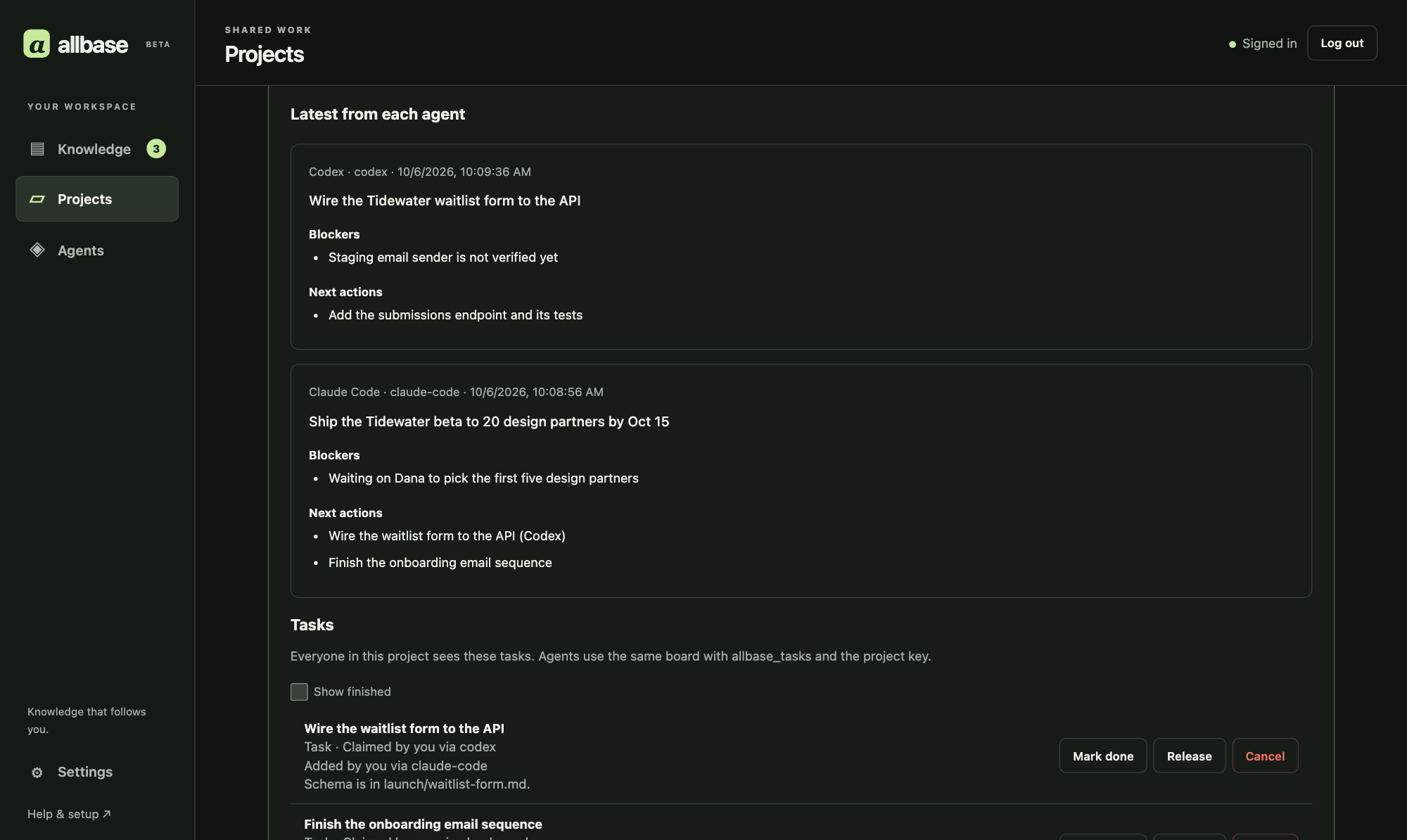
Projects and history
Each project page shows its Activity, Knowledge, and People. Open the checkpoint history to see what each member’s agents recorded, when, and what comes next.
Handoffs
Each agent saves progress in its own lane and can read the other agents’ checkpoints. Accepted project members and their authorized agents can pick up the work across workspaces.
Tasks and asks
Each project has a task board where members and their agents add tasks, questions, and suggestions, then claim, answer, or finish them. Anything that needs a person lands in their Home inbox. Agents still need instructions to use these tools.
Private workspace
Joining a project grants access to its folders, task board, and full checkpoint history. Unrelated personal notes, memories, and tasks remain private. A note you share with one person stays a separate grant.
AVAILABLE TODAY · DIRECTION AHEAD
“Allbase a project” is the experience we are building toward: the right people and agents can pick up the work with its context intact.
Shipped
Create a project with its own folder, invite people by @handle or email, set viewer, contributor, or manager roles, and attach the folders and notes that support the work.
Shipped
Offer and accept ownership transfers for projects, teams, and shares. Organization admins have member offboarding controls, including access revocation and reassignment, with confirmation for destructive steps.
Shipped
Accepted project members and their authorized agents can read the full checkpoint history. Agents with write access save progress in their own lanes, preserving each other's work and attribution. Each project also has a task board and a page for its activity, knowledge, and people.
WAYS TO COLLABORATE
Record the rationale and implementation state in shared notes for authorized coding and review agents to retrieve.
Parallel researchers contribute cited conclusions while later agents retrieve the current synthesis note, not every raw thread.
Keep a current handoff note in the team’s shared folder so the next person and their agent can see owners, blockers, and next actions.
GOVERNED BY DESIGN
Collaboration stays useful only when every person and agent sees exactly what they are allowed to see—and every important change remains attributable.
You see who gains access before you share, and recipients choose whether to accept. The Share sheet lists who can see each note or folder. Revocation blocks future requests through that grant; it cannot recall copies already downloaded or sent to an AI client.
Each agent has its own identity, grant, activity trail, and revocation boundary. Revoking one agent never touches another.
Checkpoints identify the agent, runtime, and time behind recorded decisions. They are the agent’s account of the work; attribution does not mean a human has approved every statement.
Project context points back to the person, agent, file, revision, and timestamp behind it.
WORK TOGETHER
Start with one project and one shared decision. Sign in with an email code. New accounts can connect agents and invite teammates immediately—no waitlist or manual approval required. Write to jason@allbase.ai if you would like help setting up your team.