Allbase

ALLBASE YOUR PROJECT.

Stop starting over with every AI agent.

Allbase gives Claude, Codex, ChatGPT, Cursor, and other authorized agents the same durable knowledge. Switch tools or open a fresh session and keep the decisions, context, and next steps that matter.

  • Private by default
  • Plain Markdown
  • Hosted MCP + OAuth
  • Exact source citations

THE PROBLEM

Your AI tools do not share a memory.

Useful decisions disappear into old chats. A new session asks for the same background again. Switching models means rebuilding the context by hand.

Allbase keeps that context outside any single assistant, in one governed workspace that both you and your agents can use.

HOW IT WORKS

One knowledge loop across every session.

Your files stay canonical. Allbase handles the memory, retrieval, and permissions around them.

  1. 01

    Connect each agent

    Use hosted MCP and a browser OAuth grant. Each agent gets its own identity and access scope.

  2. 02

    Allbase your project

    Save its decisions, working notes, and next steps in one workspace. Give the next authorized agent a place to start.

  3. 03

    Carry the work forward

    Continuity checkpoints preserve the current objective, decisions, blockers, completed work, and next actions.

  4. 04

    Retrieve what matters

    Agents get a bounded context pack with links to the exact file, heading, and revision behind each answer.

SEE IT

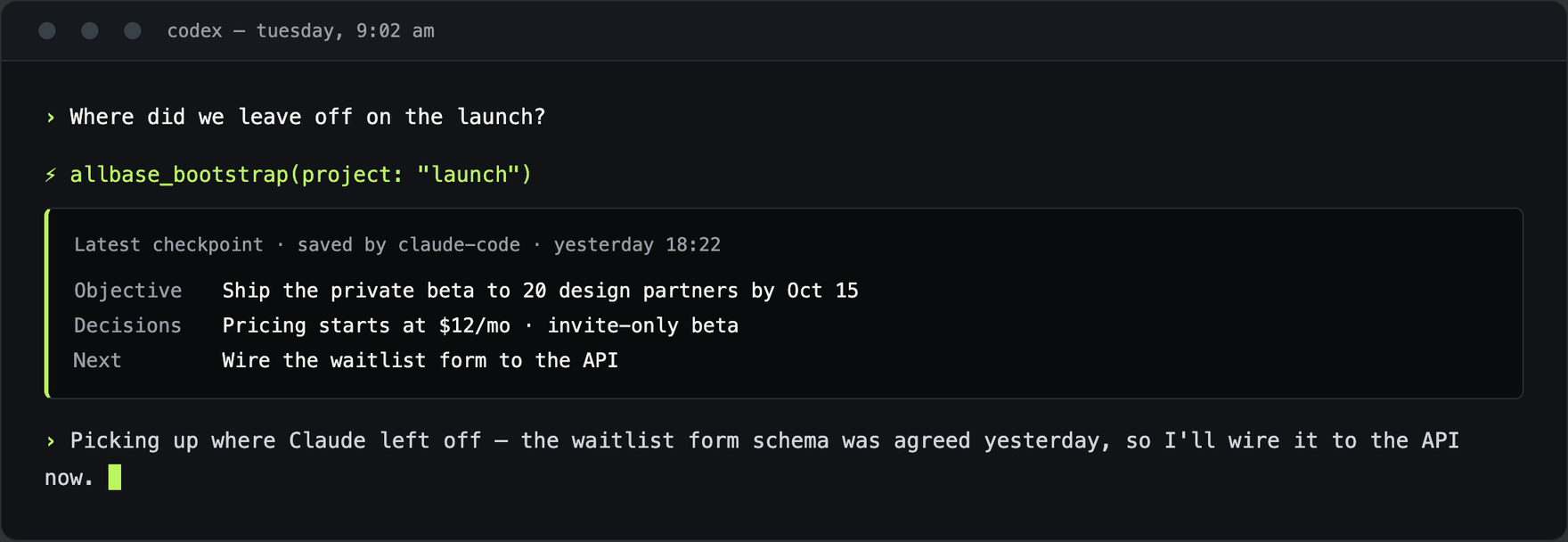
Tuesday morning, a brand-new session.

A fresh agent bootstraps the latest checkpoint — objective, decisions, next actions — and picks up mid-project. No pasted transcript.

A fresh Codex session retrieving the latest Allbase checkpoint — objective, decisions, and next actions saved by Claude the day before — and continuing the work

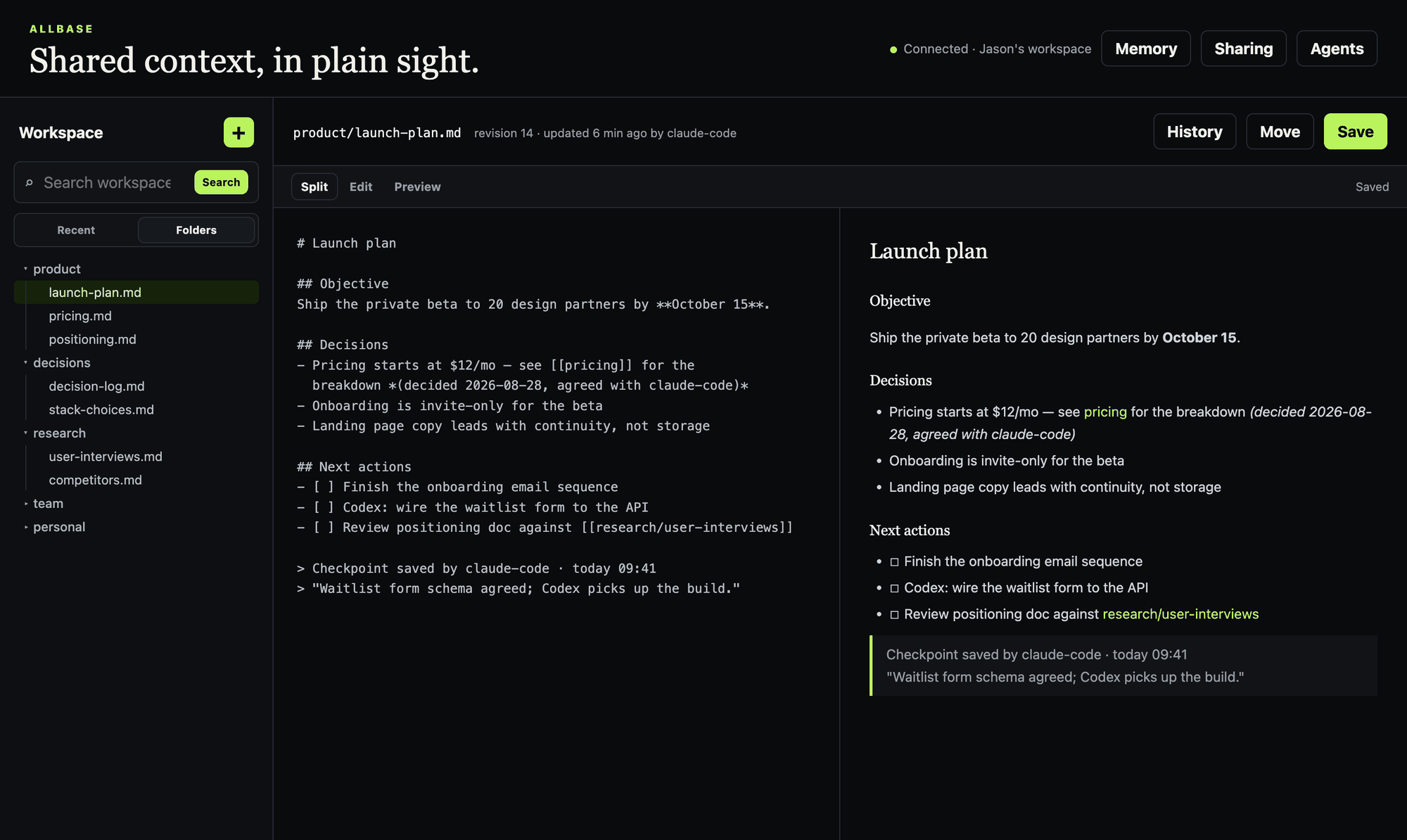
The workspace behind it.

Plain Markdown you and every authorized agent share — with revision history, attribution, and the checkpoint trail in plain sight.

The Allbase workspace: folder sidebar, split Markdown editor and preview, and a revision attributed to the claude-code agent

WHAT YOU GET

Less repetition. Better continuity. More control.

Continuity

Pick up where another agent left off

Start fresh in a different model or coding harness without pasting the last transcript. The new agent can retrieve the useful current state and continue the work. Projects brings your saved workstreams together with a browsable checkpoint history and each agent’s latest update.

Provenance

Know why an agent believes something

Durable memory stays linked to its source file, heading, revision, and author.

Portability

Keep the knowledge you create

Import or export current notes as ordinary Markdown. Pull them to a local folder, review changes, and push updates. Download file artifacts separately.

Teams

Share knowledge without losing control

Create a project, invite teammates with roles, and link the files or folders you choose to share. Accepted members and their authorized agents can read the full project checkpoint history. Personal notes stay private; linked file shares have their own acceptance.

Files

Keep the source beside the knowledge

Store versioned PDFs, documents, and images. Add a linked Markdown summary or transcript for search; supported files also open in a preview.

Skill Library

Reuse the way you work

Review private skill drafts, publish a fixed private release, and download its exact files. A local helper supports approved documentation-only installs in Claude Code repositories. See the helper guide.

Agent activity

See what your agents have been doing

Review observed activity, refresh connection health, track task claims, and answer questions waiting on you. Installation reports show client-reported local file checks separately from current release status.
BUILT FOR REAL WORK

A shared operating memory, from solo work to teams.

Solo operators

Move between models without losing the thread

Keep product decisions, research, preferences, and project state available across your daily agent stack.

Builders

Give every coding agent the same project truth

A new session can bootstrap the latest objective and next actions before it changes the code.

Teams

Create an agent-readable knowledge base

Share policies, documentation, and working folders with explicit permissions and source attribution.

TRUST BY DESIGN

Clear permissions. Visible history. Honest limits.

Allbase treats identity, permission, attribution, and recovery as product features. Access is explicit, writes are traceable, and your source files stay portable.

Scoped, revocable access

Every agent has a named identity. Revoke a grant without changing access for the rest of your stack.

No silent overwrites

Conditional writes reject stale changes. Retained note and artifact revisions support review and restore.

Private by default

Knowledge stays inside your workspace unless you explicitly share it with a person or team.

Auditable by humans

See which user or agent changed a file, which share carried the change, and what revision was used.

We are working toward a SOC 2 Type II examination. Allbase does not yet have an independent SOC 2 report. Read our safeguards, readiness work, and current gaps.

COMMON QUESTIONS

What people want to know first.

Which agents can use Allbase?

Allbase supports MCP clients with a compatible OAuth flow. The setup guide lists routes for Claude, Claude Code, ChatGPT, Codex, and Cursor, with observed evidence and account-specific limits.

Does Allbase replace my notes?

No. Your Markdown files are the source of truth. Allbase adds governed search, durable memory, context retrieval, sharing, and agent access around those files.

Can teammates write to shared knowledge?

Yes. You choose read-only or read/write access for a file or folder. The recipient must opt in, and shared writes are attributed to the acting user and agent.

Can I leave with my data?

Export current Markdown notes with paths, frontmatter, and wikilinks intact; download artifacts separately. The export does not include all history, checkpoints, or audit records. See the export scope.

GET STARTED

Allbase your project. Pick it up with your next agent.

Sign up / Sign in

Ready to connect an agent? Agent access requires beta approval. Paste one prompt into Claude Code, Codex, or Cursor — or follow the setup guide for other supported clients:

Set up Allbase by following the official instructions at https://allbase.md. Complete the setup yourself, use OAuth, ask before writing global agent instructions, and verify allbase_status when connected.